Every deal, weighed.
Type four numbers from any deal. The instrument runs them through ten exit strategies, ranks every one, and reads out a verdict before you write the offer. It is the same math we run on our own rentals, flips, and new builds in Dallas-Fort Worth.
No contract. Cancel in two clicks. $39.99/mo when you outgrow free.
Best exit: DSCR Loan, scored 100/100. About $1.3k/mo cash flow at a 6.4% cap.
Live output from the real engine. Assumes 7% vacancy, 40% opex. The app lets you change everything.
The strategy you almost picked is rarely the best one.
Most calculators score one strategy at a time and leave the comparison to you. DealValuator weighs the same address ten ways and ranks them. We built it after watching our own deals: a house that looked marginal as a flip turned out to be a strong BRRRR, and nothing on the market would have said so.
Under the hood: cap rate, cash-on-cash, DSCR, the 70% rule, yield on cost, development spread, five-year pro forma with IRR, depreciation, ±10% stress tables, an investor waterfall for the capital stack, and a buy box you define once. The math is deterministic — same inputs, same answer, every time — which is exactly what a lender wants from your numbers.
Four numbers in. A verdict out.
Type the numbers — or paste the listing
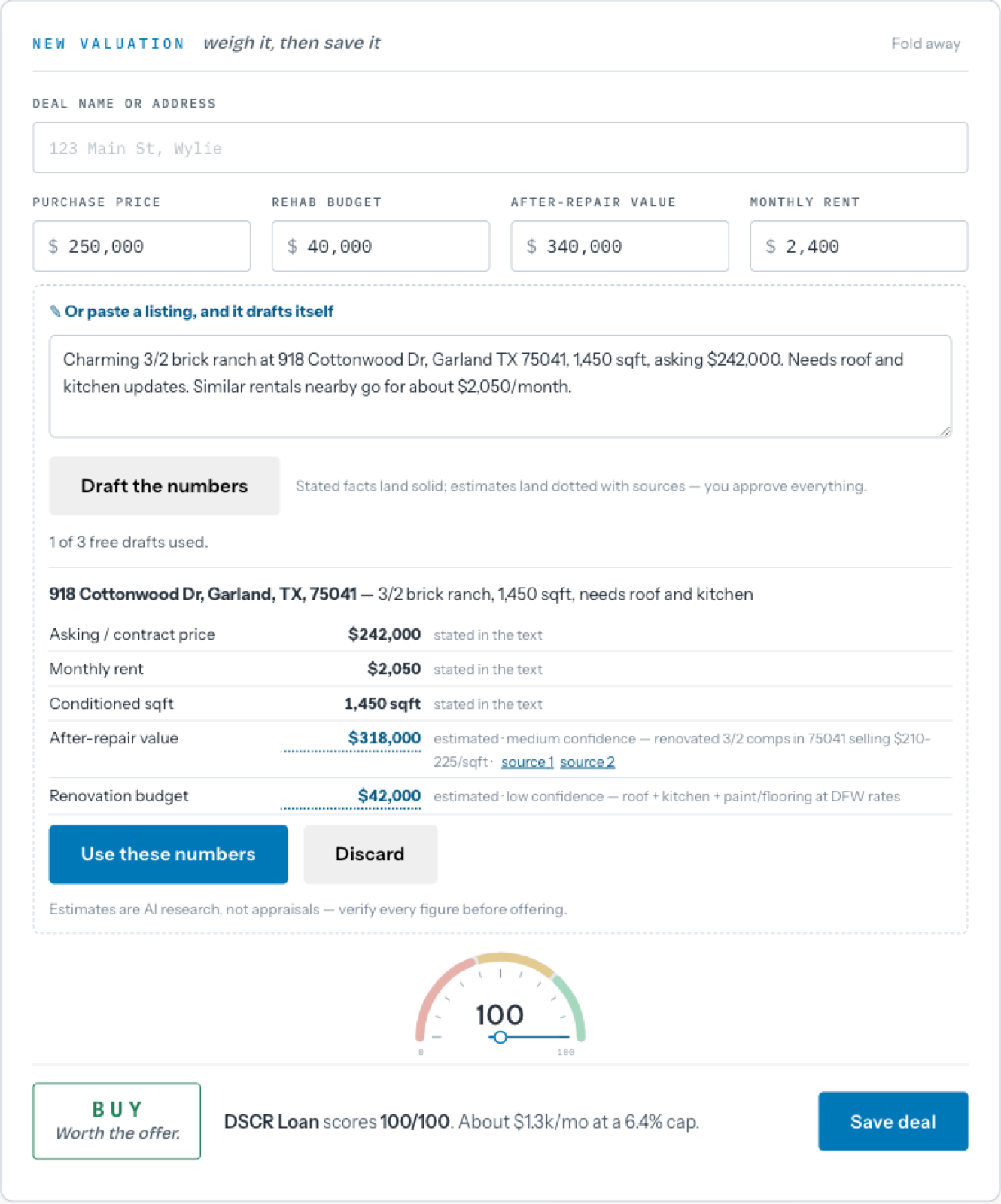
Purchase, rehab, ARV, rent. Or paste the MLS blurb and let the intake draft them: stated facts land as-is, estimates land marked as estimates, and nothing saves until you approve it.
The needle finds the best exit
Ten strategies scored 0 to 100 against your buy box, ranked with the reasons spelled out — and a list of exactly what kills the deal at the asking price. A deal that fails gets told why, in plain English.
Run it, then share it
The deal that goes hard gets a budget, a schedule, draws, and change orders. Every deal gets a lender-ready page with its own link, plus PDF, Excel, and Word export — and you can see when the report gets opened.
Open the app, get told what needs you.
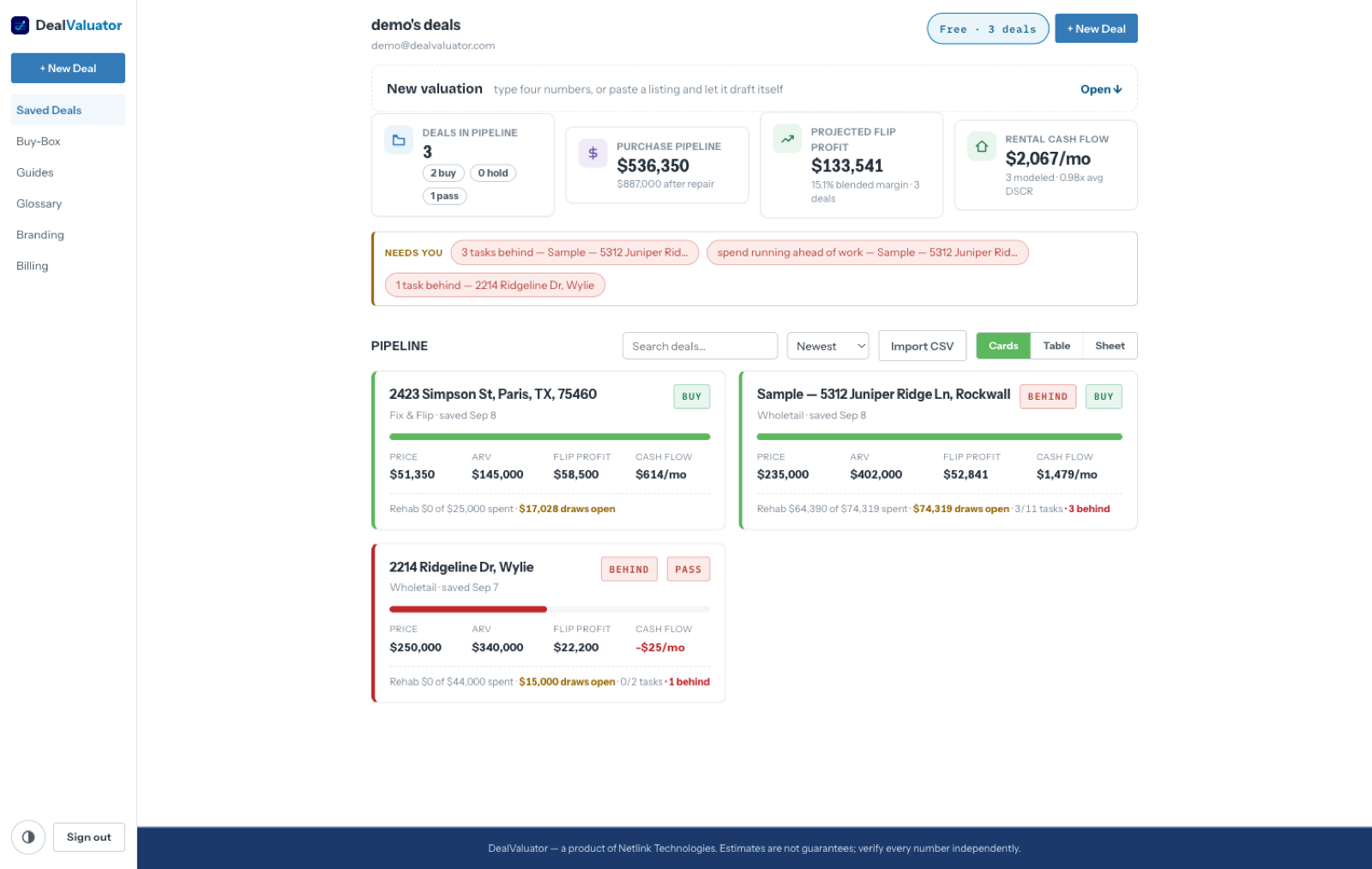
The dashboard leads with a “needs you” strip — tasks running behind, spend outpacing the work, a deal missing the one input its verdict leans on — each a link straight to the fix. The KPI widgets double as navigation: click a verdict count to filter, a money figure to sort. Every deal renders as a card, a table row, and an editable sheet.
A numbered ledger that argues with you.
Row 17 is the finished value on every deal, forever — so a phone call about “row 24” means the same thing to everyone. Six exit tabs run off one set of inputs: Fix & Flip, Hold & Refi, Wholesale, Wholetail, DSCR, Ground-Up.
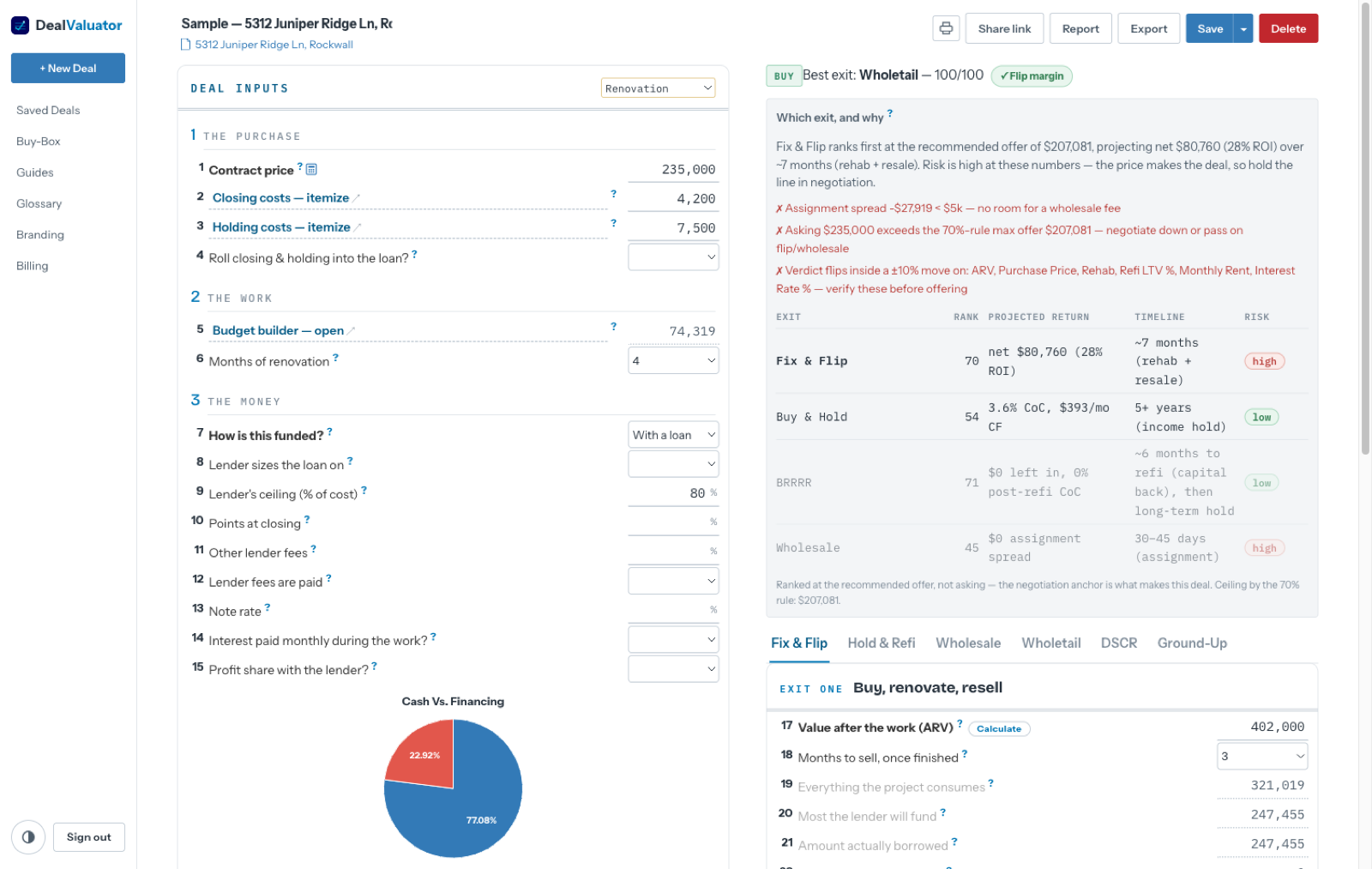
- Which exit, and why — every strategy ranked, with projected return, timeline, and risk. When asking exceeds the 70%-rule ceiling, it re-ranks at the recommended offer and says so.
- Deal killers, named — a negative assignment spread, a DSCR under 1.0, a thin flip margin: listed at the top so you know what to renegotiate before you call.
- The stress test — every driver moved ±10% and re-scored, ordered by how hard it swings the verdict. The number to verify hardest is always the top row.
- Your buy-box — write your minimums once (cap rate, DSCR, flip margin, spread) and every worksheet shows pass/fail against your bar, not ours.
Paste a listing. Review the draft. Keep the math.
The AI here drafts; it never decides. Facts stated in the text arrive in solid ink. Anything estimated — ARV, rent, a rehab ballpark — arrives dotted, with a confidence tag and its reasoning, and the deterministic engine scores whatever you approve. Same convention everywhere: solid ink is yours, dotted ink is a draft.
- Receipt scan — photograph an invoice on the project's Costs tab and the ledger row drafts itself. Accept records it; the ledger only ever holds what a person approved.
- Report narrative — one button writes the deal story and the honest risk paragraph around your computed figures. The numbers pass through untouched, and the report says the prose was drafted.
The deal that goes hard needs more than a verdict.
Ballpark the renovation with one lump figure while you're deciding — then load a template (Cosmetic, Full Gut, New Construction) and it prices the scope and offers to draft the matching schedule: phases, durations, dependencies, dated from today.
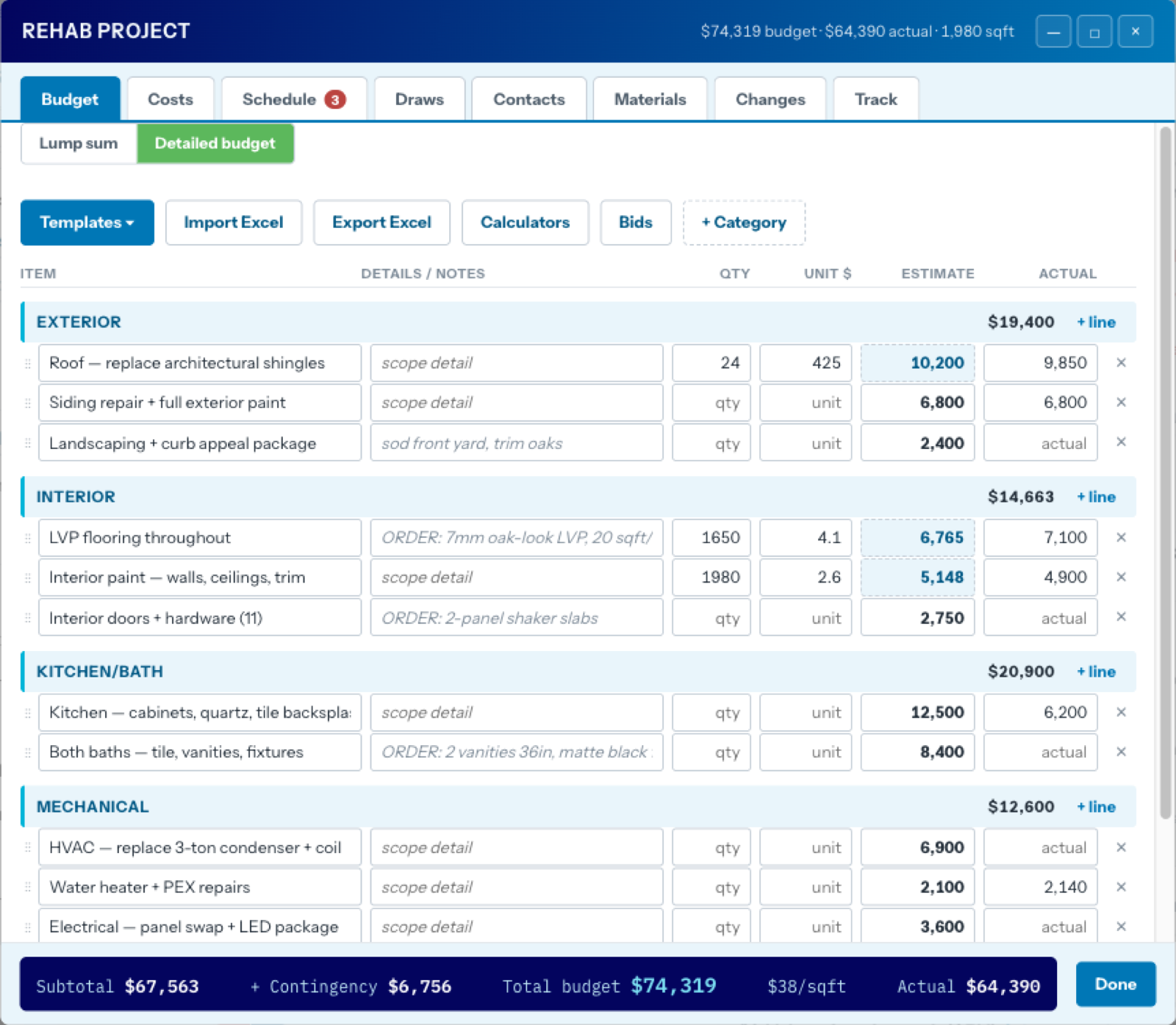
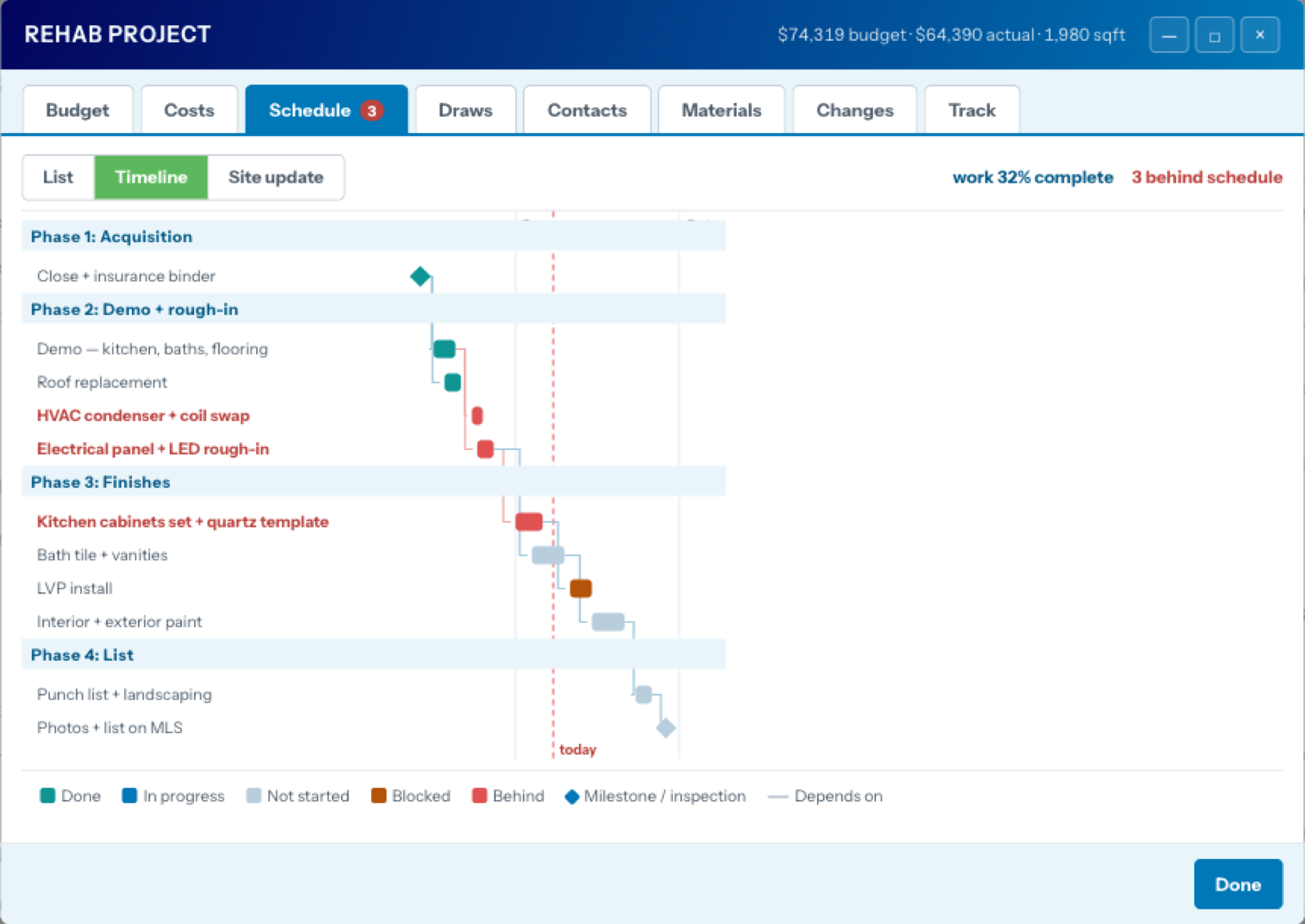
- Bid leveling — three bids per line, the low one highlighted; one click makes it the estimate. Takeoff calculators turn measurements into concrete by the quarter-yard, paint by the gallon, flooring by the box.
- Site updates in under a minute — a field view showing only what's live, one tap per answer. It feeds the work-vs-spend read: when spend runs ahead of the work, you hear about it before the next draw.
- Draws, materials, change orders — a lender draw schedule generated from the budget, an order list pulled from your scope notes, and scope changes with a paper trail: only approved changes move the working budget.
- A real benchmark — your budget's $/sqft compared, trade by trade, against a completed Dallas–Fort Worth build's final paid invoices. Not a rule of thumb; a closed-out project.
- Excel round-trip — the whole project exports as one workbook, prices offline with your contractor, and imports back.
Six reports, one link, zero screenshots of spreadsheets.
Every deal carries a permanent share link that renders whichever report you compose: the full analysis, a lender pitch with hero numbers and an LTV warning, a buyer flyer, a budget & variance ledger, a contractor RFP with every price stripped, or the final wrap — what you underwrote next to what actually happened, ending in the lesson for the next offer.
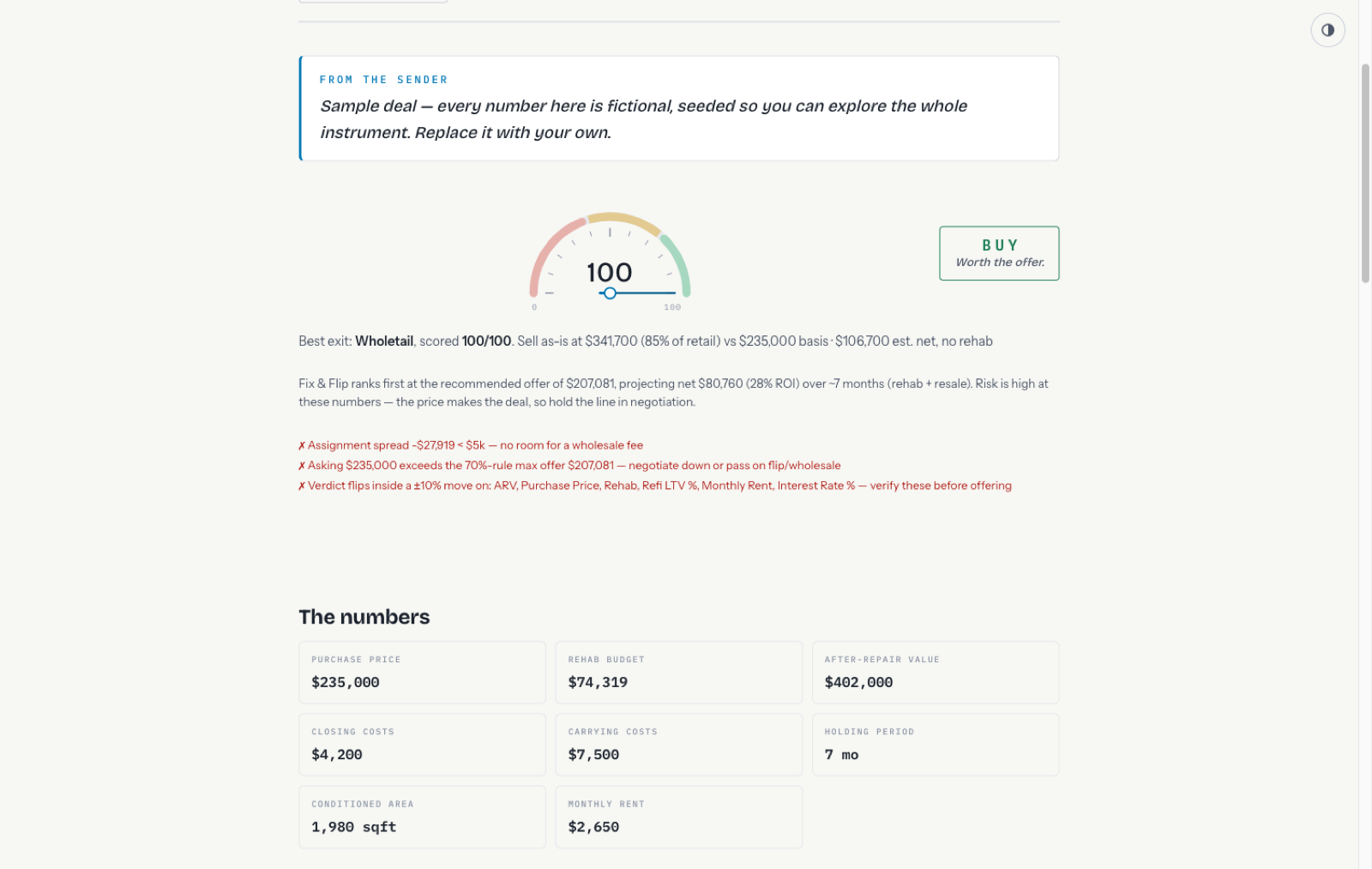
- Your brand on it — logo, colors, and disclaimer dress the lender and flyer templates. Printing the page is the PDF.
- Every working format — Excel workbook, CSVs, a formatted Word document, and a five-sheet project workbook.
- View tracking — the deal page counts how many times your link has been opened.
You start with a worked deal, not a blank page.
Every new account opens with a complete sample — budget with bids and actuals, a phased schedule mid-flight, draws, materials, change orders, an investor — so the first thing you see is the instrument working. A built-in wiki walks every job with worked scenarios you can type in, a 70-term glossary defines everything in plain English, and every row on the worksheet explains itself on hover.
Your deals are yours. The database enforces it.
Isolation isn’t an application feature here — it’s a database rule. Every table carries row-level security keyed to your organization, so another account’s query physically cannot return your rows, even if the app code were wrong. We run Supabase’s security advisors against the live database and re-check after every schema change.
- Row-level security on every table — enforcement lives in Postgres, beneath the application, where a bug in our code can’t reach around it.
- Nothing is shared until you share it — reports go out only through links you create, showing only what you chose; delete the deal and the link dies.
- Passwords we never see — hashed by the auth provider and checked against known breach lists at signup.
- No data sales, ever — your deals exist to compute your analyses, not to feed an ad machine. It’s in the Privacy Policy in writing.
- Leave with everything — Excel, CSV, and Word exports at any time; deletion is one email.
More questions? The FAQ answers them without the fog.
The whole engine for less than the shallow tools charge.
The math is never paywalled. Paid tiers add volume, branding, and data, because those cost real money. The analysis does not.
- 3 active deals, a worked sample included
- The full engine — every strategy, verdict, and stress test
- All six report templates, share links, every export
- 3 AI drafts of each kind to try
- Reports carry the DealValuator mark
- Everything in Free, without the ceilings
- Unlimited deals and scenarios
- Uncapped AI drafting — listings, receipts, narratives
- White-label reports: your name, logo, and colors on the cover
- Priority support from the people who built the math
- Everything in Pro, for shops that underwrite together
- 5 seats on one shared pipeline
- One buy-box and one brand across the whole team
- Early access — we onboard team accounts by hand
Founding members: the first 100 accounts lock in $29.99/mo for life. Month to month, no contract, cancel yourself in two clicks.